AozoraEpub3-JDK21 Download
Latest: v1.6.1-jdk21 (August 27, 2026) | Release Notes
What’s New in v1.6.1-jdk21
- New setting: replace gaiji your device cannot display with a readable note. A JIS level-4 character such as
𢌞shows up as?or a tofu box when the device font has no glyph for it. With this setting on, the character is replaced by a note that says what it is, like〓(「廴+囘」). It is off by default — leave it alone and your output is byte-for-byte what it was before. The setting lives in the “Gaiji” box on the “Style” tab (how to use it) - Kana with a dakuten mark stay as they are when a bundled font can render them. Annotations such as
※[#半濁点付き平仮名か、1-4-87]turn into two characters (a kana plus a combining mark), which the bundled dakuten fonts or CSS stacking can display. These are now judged as a pair: kept whole when they can be rendered, replaced as a whole when they cannot - New page on gaiji settings: which JIS level to pick, where to put single-character fonts (
gaiji/*.ttf), and the format of the notes
See the release list for past changes.
Screenshots
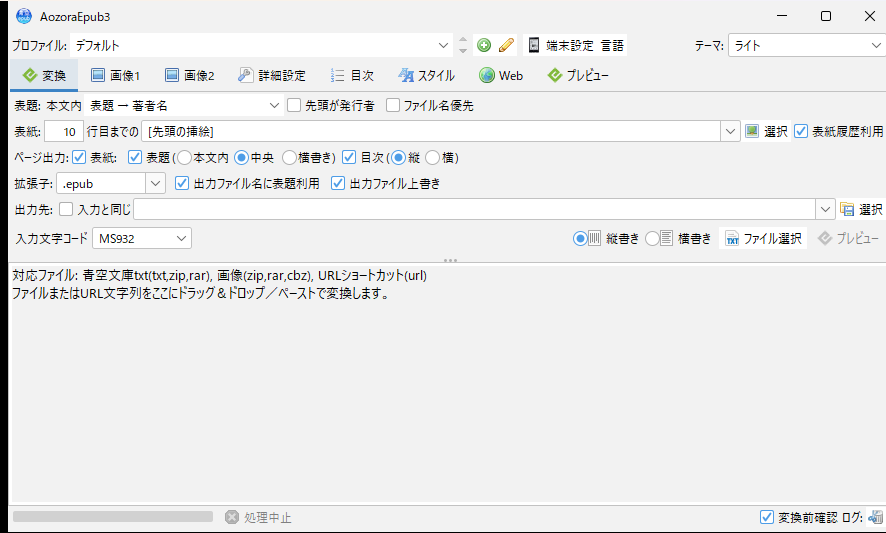
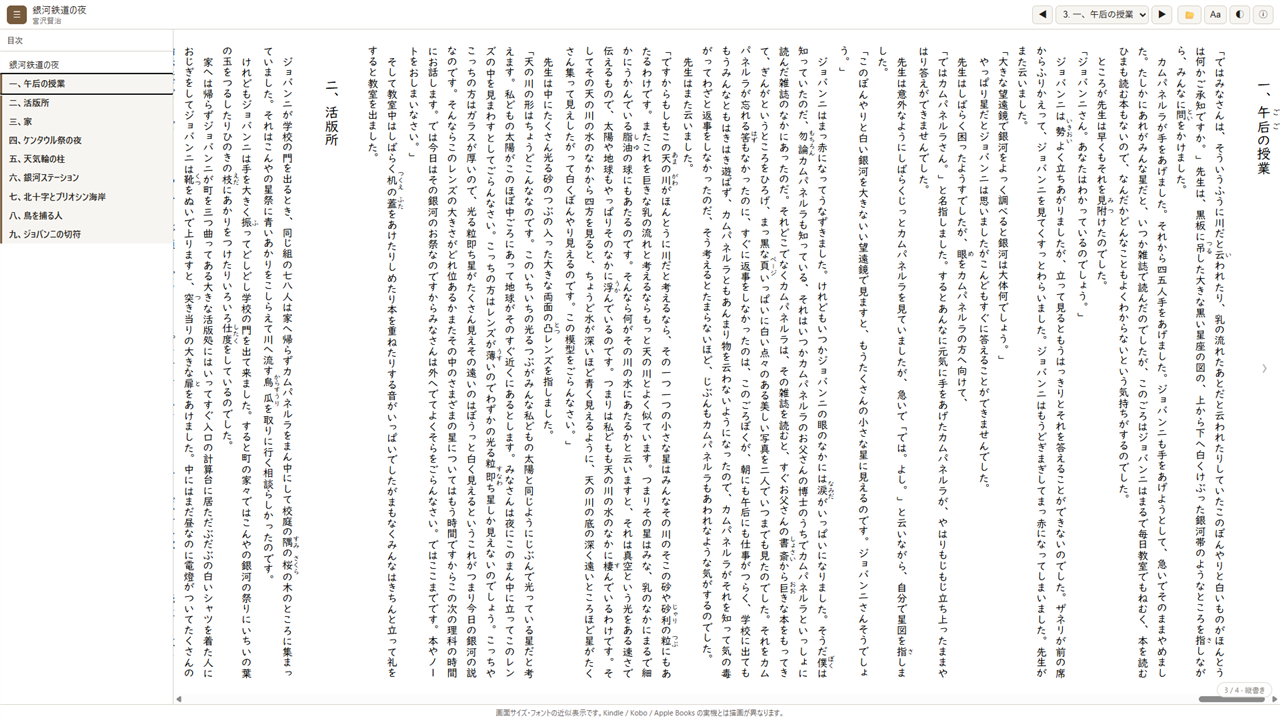
You can preview a converted EPUB straight in your browser before moving it to a reader app. The preview shows Night on the Galactic Railroad by Kenji Miyazawa from Aozora Bunko (public domain).
About This Project
This software is a derivative of AozoraEpub3 by hmdev, updated for Java 21–26 compatibility and support for modern operating systems.
It aims to comply with EPUB 3.3 and the Japanese Book Publishing Association (電書協) EPUB 3 Production Guide, validated with epubcheck 5.x.
System Requirements
- Java 25 LTS recommended
- Compatible with Java 21 LTS as well (JDK 26 runtime also verified)
- Minimum requirement: Java 21 or later
- Windows / macOS / Linux
If you don’t have Java installed, download Eclipse Temurin Java 25 LTS (Java 21 LTS also works).
Install Java 25 (Eclipse Temurin)
Windows
- Visit Adoptium Releases
- Select JDK 25 → Windows x64 →
.MSI - Double-click the MSI file and follow the installer
- Verify in Command Prompt:
java -version
macOS
- Visit Adoptium Releases
- Select JDK 25 → macOS →
.PKG(Intel or Apple Silicon M1/M2) - Double-click the PKG file and follow the installer
- Verify in Terminal:
java -version
Linux (Ubuntu/Debian)
- Visit Adoptium Releases
- Select JDK 25 → Linux x64 →
.TAR.GZ - Extract:
tar -xzf OpenJDK25U-jdk_x64_linux_hotspot_25_x.tar.gz - Verify:
./jdk-25.x.x+yy/bin/java -versionor add to PATH
Quick Start (Windows)
- Download the latest ZIP file from Releases
- Extract to any folder
- Double-click
AozoraEpub3.exeto launch - The GUI will open when ready
Note: If double-clicking the JAR file doesn’t work, use the EXE file instead.
Installation (macOS / Linux)
- Download the TAR.GZ file from Releases
- Extract:
tar -xzf AozoraEpub3-*.tar.gz - Navigate to the folder and run:
./AozoraEpub3.sh - If you get a permission error, first run:
chmod +x AozoraEpub3.sh
Command Line Usage
For advanced configuration, you can run from the command line:
java -jar AozoraEpub3.jar -of -d out input.txt
To launch the GUI, run without arguments: java -jar AozoraEpub3.jar
See the README for detailed options.
Related Guides
- narou.rs Setup Guide (recommended) — Setting up the Rust-based compatible tool narou.rs with AozoraEpub3 (Windows 11, with screenshots). Actively updated with feature and security fixes — the better choice if you are starting fresh
- narou.rb Setup Guide — Installing the Ruby-based narou.rb and connecting it to AozoraEpub3
Troubleshooting
- Java is not installed — Download Java 25 LTS from Temurin and install (Java 21 or later also works).
- JAR file won’t open on Windows — Use the EXE file, or launch from Command Prompt with
java -jar AozoraEpub3.jar. - “Windows protected your PC” when starting the EXE — This is a SmartScreen warning, not a malware detection. Right-click the ZIP → Properties → tick Unblock before extracting, and it will not appear. Full steps
- Permission denied on Linux/macOS — Run
chmod +x AozoraEpub3.shand try again. - narou.rb says Java is not installed, but Java is installed — EPUB output has most likely failed. From v1.3.7-jdk21 the exit code on conversion failure changed from
0to1(an intentional change). See the narou.rb Setup Guide. - Detecting conversion success from a script — The CLI returns
0on success and1on failure. See Exit Codes in the usage guide. - Other issues — Report on GitHub Issues.
Related Resources
- GitHub README — Features & detailed settings
- EPUB 3.3 Guide — Changes from 3.0 and support status
- 日本語 — このページを日本語で表示